Quarantine Zone Twitch Integration Explained
Quarantine Zone: The Last Check is a tense border checkpoint simulator that places you on the front lines of a rapidly unfolding zombie outbreak. As the officer in charge, every decision matters—who you let through, who you turn away, and who may be hiding something far more dangerous than it seems. One of the game’s standout features is its Twitch integration, which turns livestreams into a fully interactive experience. In this guide we’ll show you how to set up Quarantine Zone Twitch Integration.
Quarantine Zone Twitch Integration Explained
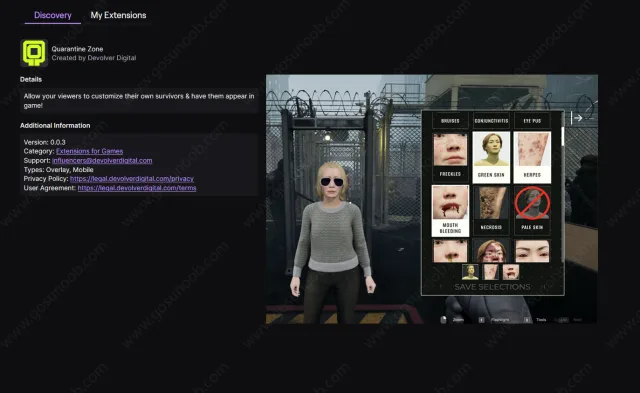
QZ’s Twitch Integration allow streamers to invite their communities to create custom Survivors. Viewers can experiment with combinations of up to three different symptoms, each arriving at the checkpoint with their own mix of symptoms, injuries, and behavioral quirks. The result is a constant stream of unpredictable scenarios.
To take part in the Twitch integration, streamers must first install the official Quarantine Zone: The Last Check Twitch extension, which is available directly through the Twitch Extensions dashboard – https://dashboard.twitch.tv/extensions/vwfl99bhpzoi36ub918nsasf7qkaf0-0.0.3. Once installed, make sure to activate the extension and set it as an Overlay, as this is required for the integration to function correctly during a livestream.
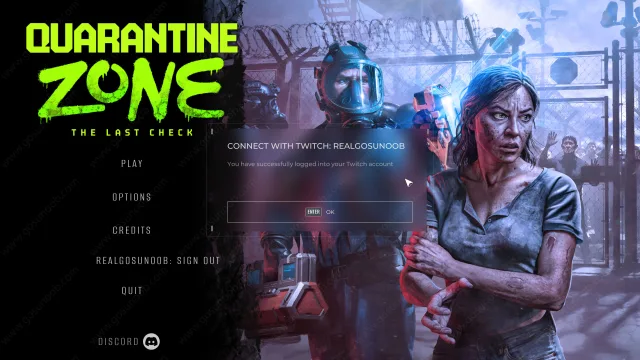
After activating the extension, launch Quarantine Zone: The Last Check and head to the main menu. From there, select “Twitch Sign In” and log into your Twitch account. Before jumping into a run, double-check that Twitch features are enabled by navigating to Settings → Gameplay and turning it on. If everything is set up properly, the game will confirm the connection with a message stating that you have successfully logged into your Twitch account.
With the extension active and your account linked, the final step is simply to go live. While you’re streaming, viewers will see a Quarantine Zone logo in the right corner of the screen. Clicking it opens a sidebar where they can choose three different symptoms and submit their selection, instantly creating a custom Survivor. Each Survivor is named after the viewer’s Twitch username, making the interaction feel personal and immediate.
It’s worth noting that some users have reported limited functionality when accessing the extension on mobile devices. Additionally, according to multiple Reddit reports, the Twitch integration currently works in Endless mode rather than the campaign, so streamers may want to plan their sessions accordingly.